Google web results are blank or will not load
On this page
Web results from Google load after the rest of the page. When they do not appear, a grey box where they should be tells you what happened. Find your message below.
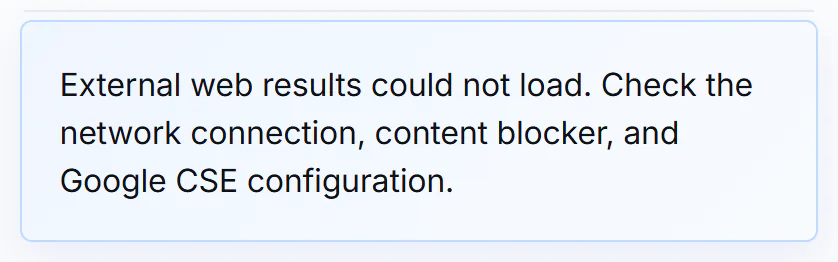
The message shown when Google's results cannot load, for example because a content blocker stopped them.
- 1The message that replaces the results
#What the message means
| The box says | What it means | What to do |
|---|---|---|
| Loading external web results… or Google-hosted web results are loading. | The results are still on their way. The page waits about ten seconds. | Wait a moment. If a Retry Google Results button is shown, select it. |
| External web results could not load. Check the network connection, content blocker, and Google CSE configuration. | Google's results did not arrive, most often because of your connection or a blocker. | Check your connection, turn off the content blocker or privacy extension for this site, and reload. |
| Google loaded, but no external web results were returned for this query. or No external web results were returned for this query. | Google answered but found nothing for these words. | Change your words, or try the News or All tab. |
| External web results are waiting for the human check. | The site wants you to confirm you are human first. | Complete the press-and-hold control above the results. See The "Please confirm you are human" check. |
| External web results are unavailable. | This site has not turned on Google-hosted results. | Nothing to fix. Use the other results on the page. |
The last part of the could-not-load message mentions the site's own setup. That part is for the site's operators, not something you can change.
#Try these in order
- Wait about ten seconds, then reload the page.
- Turn off any content blocker or privacy extension for this site and reload. Blockers can stop Google's results script.
- Try a private window, or another browser. If the results appear there, an extension or a setting in your usual browser is the cause.
- Check your connection. If other websites are slow, so is this one.
- Search for different words. If Google found nothing, the box says so.
#Google's own check
Sometimes Google shows its own box inside the results area, Please verify that you are not a robot, with an I'm not a robot checkbox. That check comes from Google, not from 4Search. Complete it the way Google asks, and the results continue.
#Your privacy choices do not cause this
Google search results are always active. They are not affected by the banner, and rejecting optional choices does not blank them. See Google search results and your privacy.
#Common questions
Why are the Google results missing but the news results are there?
The two load separately. 4Search's own results come with the page. Google's results arrive from Google afterwards and can be stopped by a blocker or a connection problem.
Where do Google results appear?
On the All, Web, News, Websites and Shopping results pages. They are not on Images, Videos or the service pages such as Finance and Weather.
I see "Retry Google Results". What does it do?
It asks the page to load Google's results again. It does not change any privacy choice.
The Web results never load in my browser but do in another. Why?
An extension or a setting in the first browser is stopping them. Turn off blockers for this site there.